

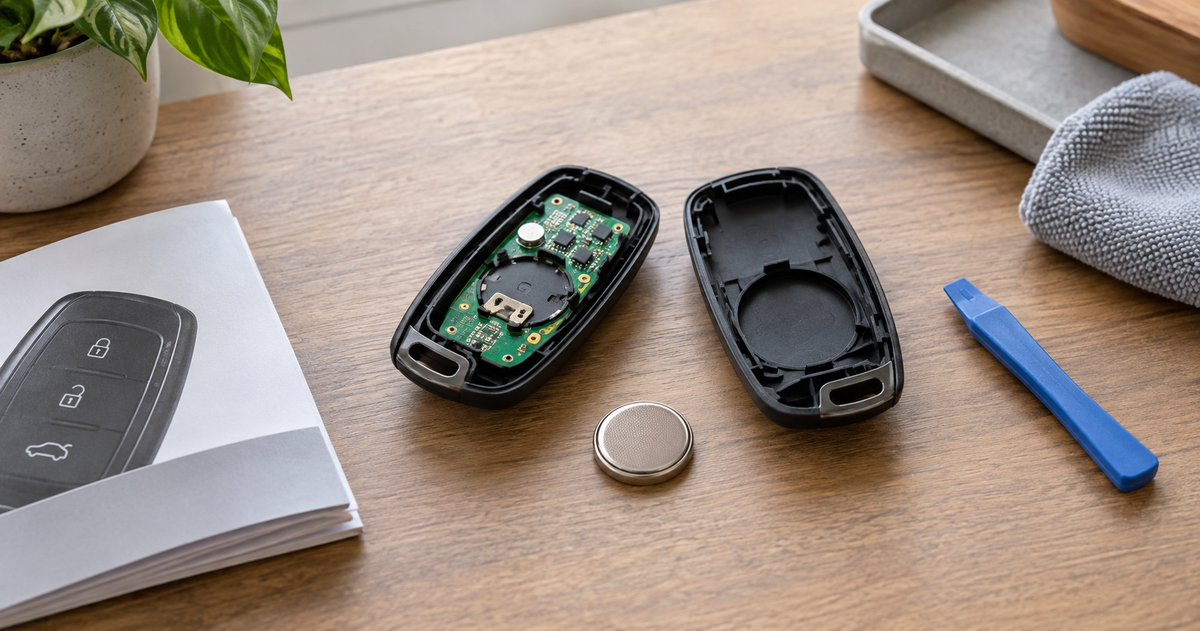
To change a key fob battery, first identify the vehicle year, make, model, and exact fob style. Check the owner’s manual or the automaker’s official support page for the required battery code and opening method. Then open the case at the specified seam or release point, note the old battery’s polarity, install the exact replacement code in the same orientation, close the case completely, and test every button near the vehicle.
Do not buy a battery or pry open the case based only on a generic video. Key fobs that look similar may use different coin cells, release mechanisms, and reinitialization instructions. The safest shortcut is not a universal procedure—it is finding the instructions for your exact vehicle and fob.
Before You Start: Record These Four Details
Write down the following information before searching for instructions:
- Model year: Instructions can change between vehicle generations.
- Make and model: Use the complete model name, including a hybrid or electric variant when applicable.
- Fob style: Note the button count, shape, removable emergency key, and any visible part number.
- Current battery code: If the case is already open, photograph the letters and numbers stamped on the old cell before removing it.
If you have two fobs, compare them before opening either one. A replacement, accessory remote starter, or later-design spare may not match the original fob supplied with the vehicle.
How to Find the Right Key Fob Battery Size
The correct battery for a key fob is the exact code specified for that fob—not simply any 3-volt coin cell. CR2016, CR2025, CR2032, and CR2450 are all real coin-cell sizes, but differences in diameter and thickness affect whether the cell fits and maintains contact.
- Open the official owner’s manual or automaker support site.
- Search within the manual for remote control battery, keyless remote battery, intelligent key battery, or key battery replacement.
- Confirm that the illustration matches your fob’s shape and button layout.
- Record the complete battery code and the required polarity.
- After opening the fob, compare the code on the old cell with the manual before installing the replacement.
If the old cell is readable, match every character. Our guide to reading battery size codes explains why similar-looking cells are not automatically interchangeable. When the old battery and the official instructions disagree, stop and confirm the fob part number with the automaker or a qualified dealer.
Why a make-only battery chart is not enough
One brand can use more than one fob design and battery size. Official examples show the variation. A current Ford owner-manual page specifies one CR2450 for the illustrated remote, while an official Honda remote engine starter manual specifies CR2032 for that accessory transmitter. These examples are not universal recommendations for Ford or Honda vehicles; they demonstrate why the exact manual and fob must control the decision.
How to Change the Battery in a Key Fob
Use the sequence below as a checklist alongside the official instructions for your vehicle. If the automaker’s procedure differs, follow the automaker.
1. Prepare a clean work area
Work on a well-lit table where a spring, emergency key, or small cover cannot roll away. Keep children and pets out of the area. Have the correct new battery ready in its packaging, along with only the tool named in the manual—often a small flat-tip screwdriver, a coin, or a nonmarring pry tool.
Do not use a knife. It can slip, damage the case, or injure your hand. Do not bridge a coin cell’s terminals with metal tweezers.
2. Remove the emergency key if instructed
Many smart-key fobs conceal a mechanical key. The release may also expose the slot used to open the battery cover. Other fobs use a screw, a twist-off cover, or a seam between two shell halves. Inspect the official diagram before applying force.
3. Open the case at the specified point
Place the named tool in the notch, tab, or slot shown in the manual. Apply gentle, controlled pressure. If the shell bends, a seam begins to whiten, or the case does not release, stop. You may be using the wrong point or may have missed a screw.
Opening methods can be quite different. The Ford example above removes the key blade, then uses a thin coin under a hidden tab to remove the cover. The Honda accessory example removes a separate battery cover. This is why “pry the two halves apart” is not safe advice for every fob.
4. Photograph the old battery orientation
Before lifting the battery out, take a clear photo showing which side faces up. Look for the plus sign in the compartment or on the exposed battery face. Avoid guessing: even within official instructions, the stated orientation is tied to a particular fob design.
Remove the cell without bending the electrical contacts or disturbing any grease that the manufacturer says to leave in place. Keep track of any gasket or retaining clip.
5. Install the exact replacement
Compare the new cell’s code with both the old cell and the official specification. Install it in the documented orientation and make sure it sits flat under the retaining tabs. Never recharge a CR coin cell; it is a primary, non-rechargeable battery.
If your confirmed code is available, you can compare current options in the BEVIGOR coin battery collection. Compatibility still depends on the exact code and the vehicle manufacturer’s instructions.
After confirming the exact battery code in your vehicle’s official instructions, view the matching BEVIGOR CR2032 battery or BEVIGOR CR2450 battery. These are code-specific shopping links, not universal key-fob recommendations.
6. Close the case completely
Align the shell, gasket, buttons, and emergency key as shown in the manual. Press only at the designated edges until the case sits evenly. Reinstall any screw or cover. If the battery compartment will not close securely, do not continue using the fob around children; have the housing repaired or replaced.
7. Test the fob
Stand near the vehicle and test lock, unlock, trunk or liftgate, and panic functions as applicable. Confirm that the physical key was reinserted and that no warning remains after the vehicle has had an opportunity to update.
Do not assume every fob needs reprogramming after a routine battery change. In the cited Ford procedure, replacing the battery does not erase the programmed key. Other vehicles may specify a synchronization step, so use only the procedure for your model rather than an unofficial button sequence.
Model-Specific Lookup Checklist
| What to confirm | Where to check | Why it matters |
|---|---|---|
| Vehicle year, make, model, and trim | Registration, VIN lookup, or official owner portal | Fob designs can change by generation or equipment package. |
| Fob shape, buttons, and part number | Back of fob, inside emergency-key channel, or dealer record | A replacement or accessory fob may differ from the standard one. |
| Battery code | Official manual plus marking on old cell | Voltage alone does not establish physical compatibility. |
| Opening point and tool | Manufacturer illustration | Using the wrong seam can crack the housing or damage a seal. |
| Polarity | Compartment marking, manual, and pre-removal photo | A reversed battery will not power the fob and may cause problems. |
| Post-change procedure | Official troubleshooting or key section | Some systems may require a documented synchronization or diagnostic step. |
If the Key Fob Still Does Not Work
Start with the simplest checks:
- Reopen the case and verify the battery code and polarity.
- Confirm that the cell is seated under the contacts rather than on top of them.
- Check that a button pad, gasket, or case clip did not shift during reassembly.
- Try the spare fob. If both fobs fail, the problem may not be the coin cell.
- Move away from possible radio interference and test close to the vehicle.
- Follow the official manual’s synchronization or troubleshooting section, if provided.
A low-battery message that returns immediately, visible corrosion, a damaged contact, water intrusion, or a cracked case calls for professional inspection. A fresh fob battery also cannot correct a weak vehicle battery, a receiver fault, or an unprogrammed replacement key.
Handle and Dispose of the Old Battery Safely
Coin cells can cause severe internal injury if swallowed. The U.S. Consumer Product Safety Commission advises immediately securing a removed cell with nonconductive tape over the terminals or around the entire battery and taking it to a battery collection center. Keep new and used batteries away from children, and never leave the open fob or loose cell unattended.
If anyone may have swallowed or inserted a coin cell, seek emergency medical help immediately and contact Poison Help at 1-800-222-1222. Do not wait for symptoms.
Battery disposal rules and collection options vary by location. Check your local solid-waste or household hazardous-waste program instead of assuming the cell belongs in household trash or curbside recycling.
Frequently Asked Questions
What size battery does my key fob take?
There is no single key fob battery size. Find the exact code in the official instructions for your vehicle year, model, and fob, then confirm it against the old cell. Common-looking coin cells can differ in thickness or diameter.
Can I use a CR2025 instead of a CR2032?
Use only the code specified for your fob. A CR2025 and CR2032 share a nominal diameter, but they differ in thickness and are not automatically interchangeable. A thinner cell may not maintain reliable contact, while a thicker cell may not fit or close safely.
Will changing the battery erase my key fob programming?
Not necessarily. Some official procedures state that a routine battery change retains programming, but requirements vary. Check the owner’s manual for your exact fob and avoid generic reprogramming sequences.
Why does my car still say “key fob battery low”?
First verify the battery code, polarity, seating, and case closure. The vehicle may also need a short period or a documented action to update the warning. If it persists, consult the official troubleshooting instructions or a qualified service provider.
Can I replace a key fob battery myself?
Many owner manuals provide a user replacement procedure. Stop and seek help if the case has no documented opening point, requires force, contains damage or corrosion, or the instructions for your exact fob cannot be confirmed.
Use the Exact Instructions, Then Choose the Exact Cell
A successful key fob battery change begins with identification, not prying. Match the vehicle and fob to an official procedure, verify the complete battery code and polarity, work gently, close the compartment securely, and test the controls. Once the required code is confirmed, choose that exact size rather than substituting a similar-looking coin cell.






Share:
How to Remove a Blink Doorbell Safely: Mount, Wiring, and App